
A person holds their hands out, palms up, with a floating badge icon showing a checkmark above five gold stars, suggesting a five-star rating or verified quality.
January 14, 2026
Improving Data Quality Using Generate Utilities
Author: Liz Brunet, Technology and Development Lead, CIID
Working in concert with the Generate Governance Group (G3), the CIID team has addressed one of the top priorities identified to make Generate easier to use and to improve SEAs’ ability to validate data prior to EDPass submission.
This key user interface enhancement is the ability for SEA users to see student level details. Before Generate v11.3, SEAs could not view student level details in the user interface. This feature modified the display of the report data using a new Pivot Grid control for student reports. The enhancement also offers category specific search options to filter the on-screen results.
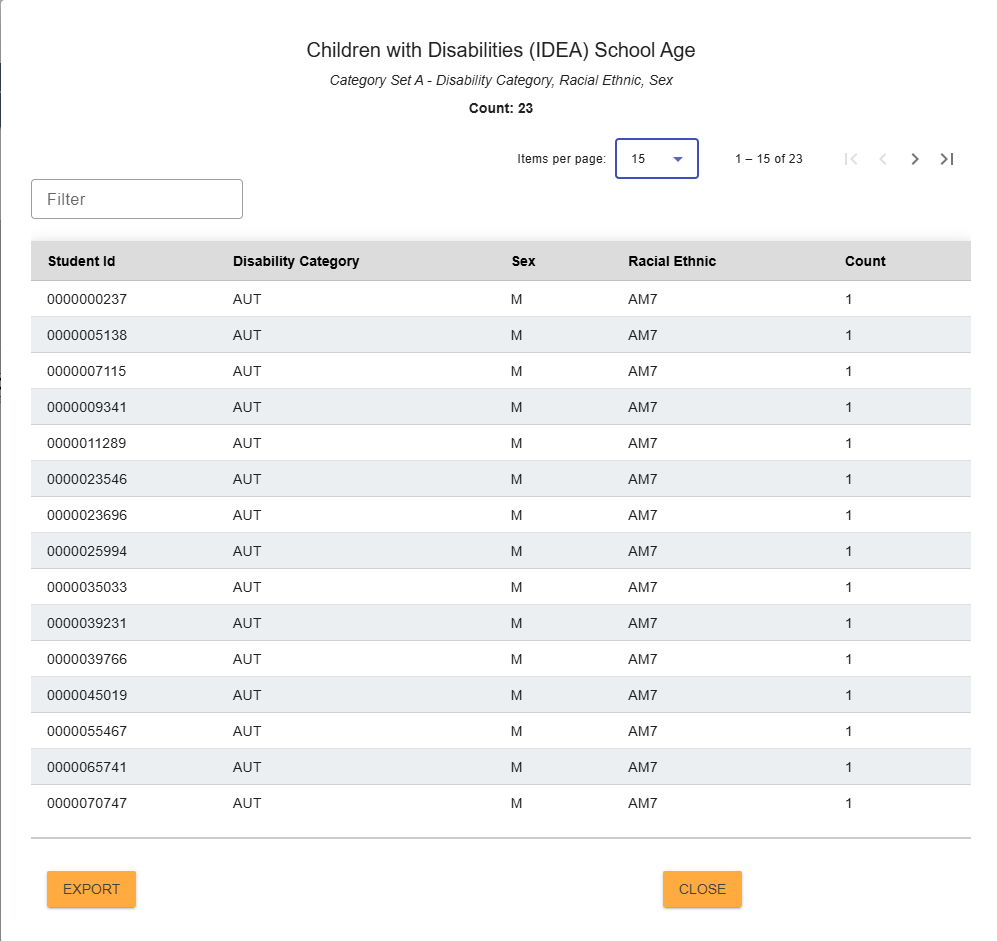
A screenshot of a sample file specification 002 displaying student level details in the Generate user interface.
Recently, Washington State used the new student-level detail functionality in Generate to quickly diagnose and resolve a complex data discrepancy that would have been difficult to identify through aggregate counts alone. By clicking directly into specific cells in the Generate user interface, staff were able to view the individual student records contributing to a reported total and compare results across different category sets, such as race/ethnicity and disability. As Sandy Grummick explained, this made it possible to see “what students are showing up here or that aren’t showing up here, or why are they showing up in these different [category sets],” which helped the team uncover that the same student was being reported under different race categories across incidents.
Madisen Black, Washington's new Data Consultant for Special Education, noted that the feature provided “the same thing as the debug tables, but without going in SQL,” allowing discrepancies to be identified much more quickly. This visibility enabled both technical and non-technical staff to collaborate, pinpoint the root cause, and decide how to adjust their ETL process to correct the issue at the SEA level, demonstrating how student-level details in Generate can significantly improve data validation and data quality workflows.
If you are interested in learning more about how Generate supports improving data quality and automated IDEA Part B EDFacts reporting, contact us at CIIDTA@aemcorp.com or visit the Generate page.