
Generate
An open-source, Common Education Data Standard (CEDS)-aligned application that helps states standardize and automate IDEA/EDFacts reporting and strengthen data quality.
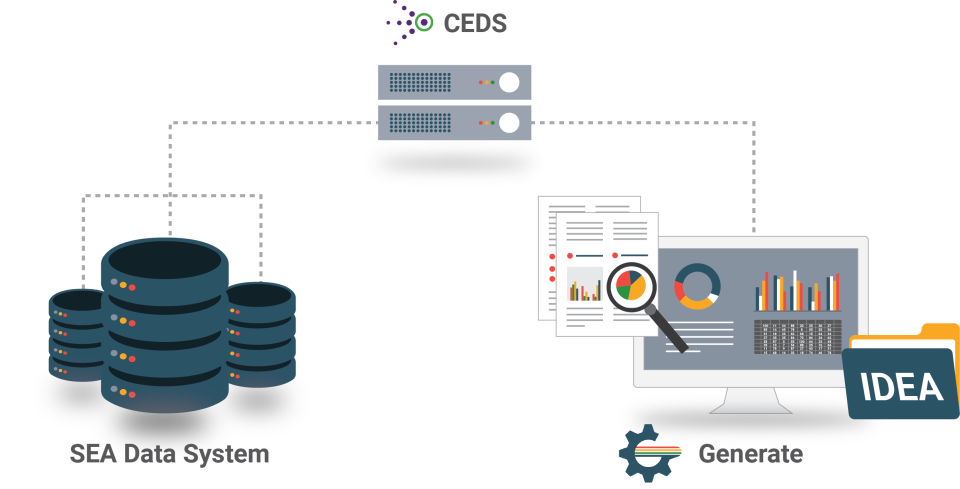
What is Generate?
Standardized data reporting support for state teams.
What it does: Generate standardizes data inputs and helps automate reporting workflows for state reporting needs.
What it is built on: It uses CEDS properties, definitions, and option sets, plus CEDS Connections to align required data to reporting specifications.
Why it matters: Generate improves consistency, reduces manual rework, and supports better-quality submissions.
How Generate fits in your ecosystem
From source data to submission-ready outputs.
Source systems
Data begins in the systems states already use to manage IDEA and related reporting inputs.
CEDS-aligned structures
Data is aligned to shared structures, definitions, and option sets.
Generate workflows and checks
Generate supports transformation, validation, and workflow steps that reduce manual rework.
Outputs for submission and state use
States can prepare data for federal submission and use the same aligned outputs internally.
Resources
Explore Generate
Use these resources to explore the codebase, implementation guidance, standards references, and the wider open-source community.
Generate Documentation
User guide, developer guide, release notes, and implementation guidance.CEDS
Definitions, option sets, elements, Connections, and the CEDS community.CEDS Open Source Community
Shared repositories and open-source collaboration space.Generate Governance Group
Join the stakeholder conversation shaping Generate.
The Generate Governance Group (G3) is a structured community for Generate users and stakeholders to preview updates, share implementation challenges, and shape priorities for tool enhancements and support materials.
What G3 stakeholders do
- Provide input on upcoming enhancements and documentation needs.
- Surface common issues and prioritize fixes and enhancements, often through GitHub issues.
- Share implementation patterns across states, including what worked and what did not.
Get started
Follow a simple path into the tool and Generate community.
Start with the core references, then explore the implementation surface, and finally connect with the people and spaces that support ongoing use.
Review the docs
Read the role-based setup overview, user guidance, and implementation notes.
Explore the repository
Review install and configuration references, the docs folder, and contribution guidance.
Connect with the community
Use the CEDS community and G3 touchpoints to stay aligned on changes and shared practices.